Formats
Metadata can be imported or exported in different formats using the upload API or download API. References between metadata objects are implemented using their business keys. Reports can be generated in common formats.
The following delimiter rules and the procedure for creating business keys apply to version 3.
Previous versions are deprecated and may use different business keys.
Business keys
When uploading or downloading, metadata objects are identified by their business keys (in contrast to the technical UUID).
A business key is composed of one or more key values (usually labels, for some types e.g. codes or names) and represents a unique, hierarchical path to a metadata object.
Business keys are used in relationships (e.g. inCollection, hasDomain) and links (e.g. derivations) to reference metadata objects.
For example, the metadata object BusinessAttribute (in the format JSON) references other metadata objects by their unique business keys Invoice and /Data Domains/Date:
{
  "_type" : "BusinessAttribute",
  "hasDomain" : "Invoice",
  "label" : "Billing date",
  "hasRange" : "/Data Domains/Date"
}
Business keys have the following characteristics:
- The local keys of the individual metadata objects in composed business keys are separated by
/. - If the referenced metadata object is located in another model, the business key begins with
/and the label of the model. Otherwise, the model is omitted from the business key. - Metadata objects, which must only be unique in their superordinate metadata object, but not in the model (e.g. subcollections, subsystems), must be preceded by the superordinate metadata object (e.g. collection, system) separated by
/.
Following the last rule, for example:
- Subcollections, which must only be unique in their superordinate collection, but not in the model, must be preceded by the superordinate collection. Consequently, all superordinate collections must be specified.
- Subsystems, which must only be unique in their superordinate system, but not in the system catalog, must be preceded by the superordinate system.
- Technical metadata objects (e.g. data objects, data types or enumerations), which must only be unique in their superordinate collection, but not in the data models, must be preceded by the superordinate collection.
- Business objects, which must be unique in their business data model, may be preceded by the superordinate collection. If so, consequently all superordinate collections must be specified as well (see above).
| Labels | Business key |
|---|---|
Address | Address |
Business data model, Person | /Business data model/Person |
Enterprise Model, Billing, Invoice, Date | /Enterprise Model/Billing/Invoice/Date |
Delimiters
Business keys use different delimiters:
/separates metadata objects in the hierarchical path.- Some types build the local key from multiple values before that local key is used as part of the
/path. These local keys use type-specific delimiters, for example.for codes in hierarchical reference values,>for relationships and translations,#for operations, and space for persons.
The relevant delimiter is / for path segments and the type-specific delimiter for local keys.
If a value of a path segment or local key contains the relevant delimiter or the character ", then it is necessary to indicate that this character is part of the value and not a separator of the business key.
This is achieved by quoting the value (using ") within the business key.
Every quotation mark within the value is duplicated.
| Labels | Business key |
|---|---|
dataspot. | dataspot. |
Technical objects, INPUT/OUTPUT | Technical objects/"INPUT/OUTPUT" |
File/Interface, TimeRecordings | "File/Interface"/TimeRecordings |
File/Interface, Employees.csv | "File/Interface"/Employees.csv |
Category, 28" City Bike | Category/"28"" City Bike" |
Codename "Kronos" | "Codename ""Kronos""" |
If the character " appears at the beginning (or at the end) of a label, then, following the rules above, at the beginning (or at the end) of the label within the composed business key there are three quotation marks (""").
For example, the labels Projects and Project "Zeus" are composed into Projects/"Project ""Zeus""".
Type-specific delimiters
For a relationship, > separates the name and the range classifier.
If the name itself contains > or ", it is quoted first in the local key.
When that local key is then inserted into the / path, these quotation marks are escaped again:
| Relationship | Local key | Business key |
|---|---|---|
Car, hasOwner, Person | hasOwner>Person | Model/Car/hasOwner>Person |
Interface, source>target, Mapping | "source>target">Mapping | Model/Interface/"""source>target"">Mapping" |
Translations, operations, and persons use the same rule with their own type-specific delimiters:
>for translations#for operations- Space for persons
If one part contains the respective type-specific delimiter or ", only that part is quoted first.
If the resulting local key is then inserted into a / path segment, its quotation marks are escaped again.
The type-specific delimiter is only relevant for the current type.
For example, > only requires handling in local keys of relationships and translations; in an ordinary path segment, > is not special.
Reference values
Reference values are metadata objects below a reference object.
Their business key therefore consists of the business key of the reference object, a /, and the code of the reference value.
For hierarchical reference values, the last path segment is a code chain: The code chain of the superordinate reference value is extended with the current code, separated by ..
| Reference object | Code | Superordinate reference value | Business key |
|---|---|---|---|
Level1 | 1 | Level1/1 | |
Level2 | 2 | Level1/1 | Level2/1.2 |
Level3 | 3.1 | Level2/1.2 | Level3/"1.2.""3.1""" |
If a code contains the delimiter . or the character ", that code is quoted within the code chain.
When this code chain is used as the last / segment of the full business key, its quotation marks are escaped again.
For example, the reference value below ReferenceObject with the codes A.1 and B is represented as ReferenceObject/"""A.1"".B".
Procedure
In summary, use the following procedure to create a business key:
- Determine the path segments and local keys.
- Build local keys with their type-specific delimiter:
.for hierarchical reference values>for relationships and translations#for operations
Space for persons - Quote only values that contain the relevant delimiter or
". - Duplicate every quotation mark within such a value.
- Join the path segments with
/.
Import/Export
Metadata can be imported or exported in the following formats:
The properties are based on the model for which metadata is imported or exported and consist of all default properties defined in the metamodel, supplemented by all custom properties configured in the respective database.
The properties of a model in a particular format can also be determined conveniently using the download in the user interface in the respective format.
The relationships between the metadata objects (e.g. inCollection, hasDomain) are represented as business keys.
Links between metadata objects (e.g. derivations) are represented as separate objects:
| Format | Links |
|---|---|
XLSX | Links are represented as business keys in a separate table. Link attributes are columns in this table. |
CSV | Links are represented as business keys in a separate CSV file. Link attributes are columns in this CSV file. |
XML | Links are represented as business keys in a separate XML element. Link attributes are subordinate XML elements. |
JSON | Links are represented as business keys in a separate JSON object. Link attributes are JSON properties in this JSON object. |
XLSX (Microsoft Excel)
The import/export in the format XLSX (Microsoft Excel) is a spreadsheet, which contains separate tables for each metadata object type (e.g. Collections, Business objects, Business attributes, Relationships, etc.).
Each table contains a list of the selected metadata objects of the respective type.
The relationships between the metadata objects are represented as business keys.
The tables in XLSX (Microsoft Excel) can be viewed analogously to the separate CSV files in the format CSV.
In the format XLSX (Microsoft Excel), the names of the properties correspond to the labels displayed in the user interface.
For literal properties the label of the code (as shown in the user interface) is expected.
The table names and headings correspond to the labels displayed in the user interface and can be imported and exported in different languages (e.g. Sammlungen or Collections, Schreibgeschützt or Read-only).
The language can be defined in the upload API and in the download API with the option language or with the HTTP header attribute Accept-Language.
Not only the selected language but also the configuration is applied to determine the table names and headings.
Users or interfaces that use the format XLSX must therefore take into account that the labels are not fixed but may have been customized.
For illustration purposes, certain columns are hidden in the following examples.
Links between metadata objects (e.g. derivations) are represented as business keys in a separate table (e.g. the table Derivations with the columns Derived to and Derived from).
Link attributes are columns in this table (e.g. the column Qualifier).
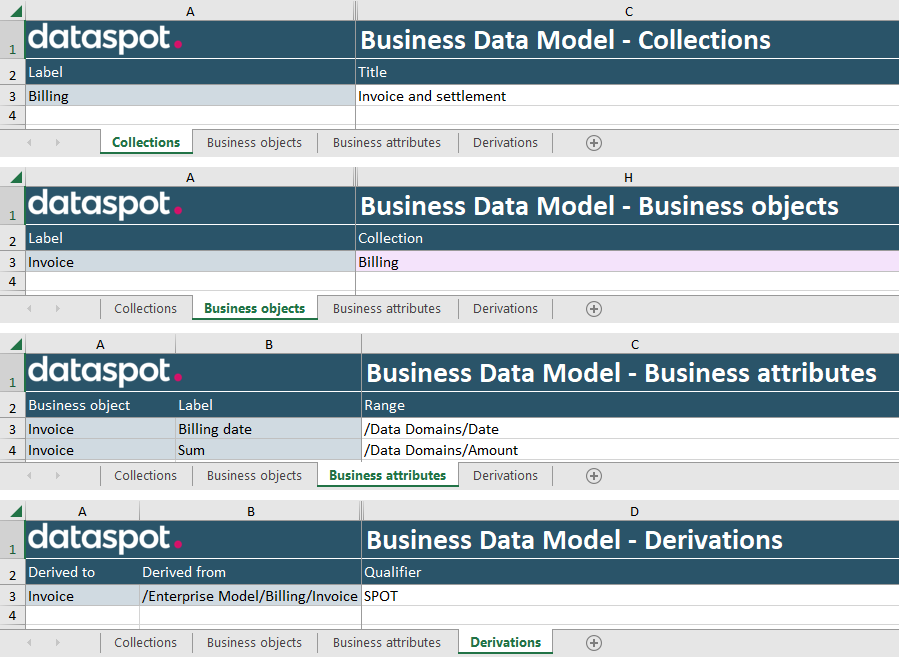
All properties that are mandatory fields according to the configuration are visualized with the background color "lilac". These fields may not be empty when uploading.
The format XLSX (Microsoft Excel) restricts the size of a cell to 32,767 characters.
CSV (Zipped)
The import/export in the format CSV is a ZIP file, which contains separate CSV files for each metadata object type (e.g. Collection.csv, BusinessObject.csv, BusinessAttribute.csv, Relationship.csv, etc.).
Each CSV file contains a list of the selected metadata objects of the respective type.
The relationships between the metadata objects (e.g. inCollection, hasDomain, hasRange) are represented as business keys.
The CSV files can be viewed analogously to the separate tables in the format XLSX (Microsoft Excel).
In the format CSV, the names of the properties correspond to the (internal english) attribute names (according to the metamodel) and therefore differ from the labels displayed in the user interface.
For literal properties the respective code (according to the metamodel) is expected.
The type of each metadata object (Collection, BusinessObject, BusinessAttribute, etc.) corresponds to the name of the respective CSV file.
For illustration purposes, certain CSV columns are hidden in the following examples.
Links between metadata objects (e.g. derivations) are represented as business keys in a separate CSV file (e.g. the CSV file Derivation.csv with the columns derivedTo and derivedFrom).
Link attributes are columns in this CSV file (e.g. the column qualifier).
Collection.csv:
label,title
Billing,Invoice and settlement
BusinessObject.csv:
label,inCollection
Invoice,Billing
BusinessAttribute.csv:
hasDomain,label,hasRange
Invoice,Billing date,/Data Domains/Date
Invoice,Sum,/Data Domains/Amount
Derivation.csv:
derivedTo,derivedFrom,qualifier
Invoice,/Enterprise Model/Billing/Invoice,SPOT
Business keys in CSV
The format CSV requires that a string containing the character ", the CSV delimiter ,, or a line break must be quoted (using ") and that every quotation mark within the string must be duplicated.
Therefore, the following two-step procedure is necessary to generate syntactically correct business keys in CSV:
- Convert values to a business key according to the described procedure.
- Convert the resulting business key to
CSV: Every business key containing the character", the CSV delimiter,, or a line break is quoted (using") and every quotation mark within the business key is duplicated.
Picking up on the previous examples, the business keys are converted to CSV as follows:
| Business key | CSV |
|---|---|
Address | Address |
/Business data model/Person | /Business data model/Person |
/Enterprise Model/Billing/Invoice/Date | /Enterprise Model/Billing/Invoice/Date |
dataspot. | dataspot. |
Technical objects/"INPUT/OUTPUT" | "Technical objects/""INPUT/OUTPUT""" |
"File/Interface"/TimeRecordings | """File/Interface""/TimeRecordings" |
"File/Interface"/Employees.csv | """File/Interface""/Employees.csv" |
Category/"28"" City Bike" | "Category/""28"""" City Bike""" |
Projects/"Project ""Zeus""" | "Projects/""Project """"Zeus""""""" |
"Codename ""Kronos""" | """Codename """"Kronos""""""" |
Level3/"1.2.""3.1""" | "Level3/""1.2.""""3.1""""""" |
ReferenceObject/"""A.1"".B" | "ReferenceObject/""""""A.1"""".B""" |
Model/Car/hasOwner>Person | Model/Car/hasOwner>Person |
Model/Interface/"""source>target"">Mapping" | "Model/Interface/""""""source>target"""">Mapping""" |
In a business key, in principle, any value of a path segment or local key may be quoted (using "), regardless of whether the relevant delimiter (/, ., >, #, or space) or " appears in the value or not.
In CSV, in principle, any string may be quoted (using "), regardless of whether the character " appears in the string or not.
This allows the following simplified (less conservative) procedure for generating business keys in CSV:
- Every value within a business key is quoted (using
") and every quotation mark within the value is duplicated. This step is omitted if the business key is simple (non-composed) and contains neither a relevant delimiter nor". - The entire business key is quoted (using
") and every quotation mark within the business key is duplicated.
XML
The import/export in the format XML contains a flat, non-hierarchical list of all selected metadata objects.
The relationships between the metadata objects (e.g. inCollection, hasDomain, hasRange) are represented as business keys.
The export in the format XML contains a reference to the XML schema (XSD).
Based on the metamodel, the XML schema contains a technical description of all structures, properties, and relationships.
In the format XML, the names of the properties correspond to the (internal english) attribute names (according to the metamodel) and therefore differ from the labels displayed in the user interface.
For literal properties the respective code (according to the metamodel) is expected.
The type of each metadata object (Collection, BusinessObject, BusinessAttribute, etc.) corresponds to the name of the respective XML element.
For illustration purposes, certain XML elements are hidden in the following examples.
Links between metadata objects (e.g. derivations) are represented as business keys in a separate XML element (e.g. the XML element Derivation with the subordinate XML elements derivedTo and derivedFrom).
Link attributes are subordinate XML elements (e.g. the subordinate XML element qualifier).
<?xml version="1.0" encoding="UTF-8"?>
<BusinessDataModel xmlns:xsi="http://www.w3.org/2001/XMLSchema-instance"
                   xsi:noNamespaceSchemaLocation="/api/test/meta/schemas/BusinessDataModel.xsd">
  <Collection>
    <label>Billing</label>
    <title>Invoice and settlement</title>
  </Collection>
  <BusinessObject>
    <label>Invoice</label>
    <inCollection>Billing</inCollection>
  </BusinessObject>
  <BusinessAttribute>
    <hasDomain>Invoice</hasDomain>
    <label>Billing date</label>
    <hasRange>/Data Domains/Date</hasRange>
  </BusinessAttribute>
  <BusinessAttribute>
    <hasDomain>Invoice</hasDomain>
    <label>Sum</label>
    <hasRange>/Data Domains/Amount</hasRange>
  </BusinessAttribute>
  <Derivation>
    <derivedTo>Invoice</derivedTo>
    <derivedFrom>/Enterprise Model/Billing/Invoice</derivedFrom>
    <favorite>false</favorite>
    <qualifier>SPOT</qualifier>
  </Derivation>
</BusinessDataModel>
JSON
The import/export in the format JSON contains a flat, non-hierarchical list of all selected metadata objects.
The relationships between the metadata objects (e.g. inCollection, hasDomain, hasRange) are represented as business keys.
In the format JSON, the names of the properties correspond to the (internal english) attribute names (according to the metamodel) and therefore differ from the labels displayed in the user interface.
For literal properties the respective code (according to the metamodel) is expected.
The type of each metadata object (Collection, BusinessObject, BusinessAttribute, etc.) is specified in the property _type.
For illustration purposes, certain JSON properties are hidden in the following examples.
Links between metadata objects (e.g. derivations) are represented as business keys in a separate JSON object (e.g. the JSON object Derivation with the JSON properties derivedTo and derivedFrom).
Link attributes are JSON properties in this JSON object (e.g. the JSON property qualifier).
[ {
  "_type" : "Collection",
  "label" : "Billing",
  "title" : "Invoice and settlement"
}, {
  "_type" : "BusinessObject",
  "label" : "Invoice",
  "inCollection" : "Billing"
}, {
  "_type" : "BusinessAttribute",
  "hasDomain" : "Invoice",
  "label" : "Billing date",
  "hasRange" : "/Data Domains/Date"
}, {
  "_type" : "BusinessAttribute",
  "hasDomain" : "Invoice",
  "label" : "Sum",
  "hasRange" : "/Data Domains/Amount"
}, {
  "_type" : "Derivation",
  "derivedTo" : "Invoice",
  "derivedFrom" : "/Enterprise Model/Billing/Invoice",
  "favorite" : false,
  "qualifier" : "SPOT"
} ]
DDL/SQL
Business data models can be exported as DDL/SQL.
Data models can be exported and imported as DDL/SQL.
The import/export is a .ddl or .sql file.
Example Billing.sql
CREATE SCHEMA "Billing";

CREATE TABLE "Billing"."Invoice" ("Billing date" DATE);

ALTER TABLE "Billing"."Invoice"
ADD COLUMN "Sum" DOUBLE PRECISION;
The metadata objects (collections, data objects, business objects, etc.) are mapped to corresponding definitions (schemas, tables, columns, etc.) in the database - and vice versa.
The specific SQL syntax depends on the selected database (PostgreSQL, Oracle, Microsoft SQL Server, MySQL) and is defined with the option targetDatabase.
XSD (Zipped)
Data models can be imported as XSD (XML Schema Definition).
The import is a ZIP file, which contains one or multiple .xsd files.
Example Billing.xsd
<?xml version="1.0" encoding="UTF-8"?>
<xs:schema xmlns:xs="http://www.w3.org/2001/XMLSchema">
  <xs:element name="Invoice">
    <xs:complexType>
      <xs:attribute name="Billing date" type="xs:date"/>
      <xs:attribute name="Sum" type="xs:float"/>
    </xs:complexType>
  </xs:element>
</xs:schema>
The schema components (xs:element, xs:attribute, xs:complexType, etc.) are mapped to corresponding metadata objects (data objects, technical attributes, enumerations, etc.).
JSON Schema (Zipped)
Data models can be imported as JSON Schema.
The import is a ZIP file, which contains one or multiple .json files.
Example Billing.json
{
  "$schema": "http://json-schema.org/draft-04/schema#",
  "$id": "https://dataspot.io/test/billing.json",
  "title": "Invoice",
  "type": "object",
  "properties": {
    "Billing date": {
      "type": "string"
    },
    "Sum": {
      "type": "number"
    }
  }
}
The schema components (type, properties, etc.) are mapped to corresponding metadata objects (data objects, technical attributes, enumerations, etc.).
Reports
The built-in reports can be generated in the following formats:
In addition to the built-in reports, customer-specific reports can be implemented in XSLT and be uploaded and edited on the tenant page. Customer-specific reports may support other additional formats.
Certain reports use proprietary formats while other reports comply to established standards or requirements (e.g. GDPR Processing Records).