Application
The application is an enterprise-grade, highly customizable ETL application - delivered as a single, self-contained JAR.
It ships out-of-the-box with connectors that extract and transform metadata from multiple sources:
- Databases (JDBC)
- Storage systems (e.g. AWS S3, Google Cloud Storage, Azure Storage)
- Data catalogs (e.g. Databricks Unity Catalog)
Enterprise users can create and execute services - each specifying one of the available service types. While the application may also support more general services (e.g. maintenance services), the basic idea is that services are typically connectors that, for example, extract metadata from a source, apply ingestion and transformation rules, and upload the metadata to a destination application.
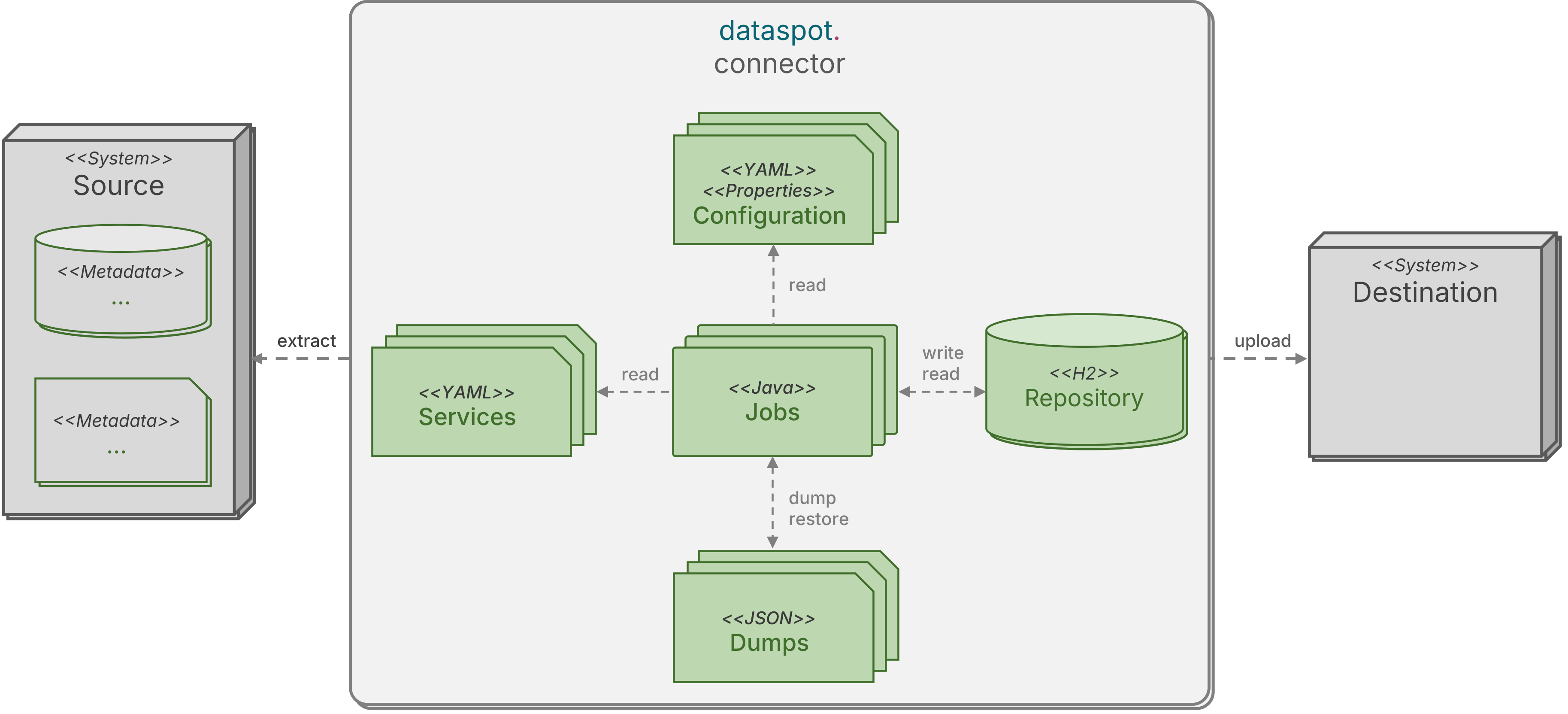
Sophisticated features round off the complete package:
- Dump and restore capabilities
- Embedded working database
- Advanced pattern filters
- Standardized authentication methods
- Smart, agent-based reconciliation mode
- Workflow support
The application has a low memory footprint and can scale to arbitrarily large volumes of metadata without ever materializing the full magnitude of data in memory. It uses an embedded database with a landing repository to store raw extracts, and a staging repository to hold transformed entities before the final upload - all without the need to manage external databases.
Installing the application
The application is packaged and delivered as a single, executable JAR. The bundle includes the executables, resources, configurations, 3rd-party libraries and even an embedded database system and a web server. No further JARs are required to start the application.
The application does not rely on any external components, such as a database management system or an external servlet container - everything is contained in the delivered bundle.
Specific services might require additional JARs (for example, a specific JDBC driver).
These can be loaded dynamically by specifying them in the configuration property connector.config.jars.
The class path cannot be manipulated (java -classpath) to add additional JARs.
As a self-contained executable JAR, the application does not require any installation - just start the JAR 🙂.
A Java 21 or higher JRE (Java Runtime Environment) is required to start the application.
Starting the application
The application is started as an executable JAR using java -jar:
java -jar dataspot-connector.jar
In general, when the application starts, it automatically
- loads the application configuration,
- loads the additional JARs,
- and creates the working database, if it doesn't exist.
System properties (JVM) can be specified on the command-line as java -Dkey=value (for example, to configure the proxy settings, to define placeholders, or to define configuration properties).
They must be passed before the command-line argument -jar.
Example: System property
java -Dutilities.dump=true -jar dataspot-connector.jar
CLI application
After startup, the command-line interface (CLI) application loads and validates a single service from the specified service file, executes the service, and finally terminates.
java -jar dataspot-connector.jar <options>
The options are passed in GNU-style syntax --key=value.
| Option | Required | Description |
|---|---|---|
--service=<name> | mandatory | The service name. The service is located in the service file (option --file). |
--file=<file> | optional | The absolute or relative path to the service file containing the service (option --service). |
--verbose | optional | Enables verbose output mode. |
If the service file isn't specified, the default service file defined in connector.config.service.file is used.
Example: CLI application
java -jar dataspot-connector.jar --service=MyService --file=/home/connector/services/myservices.yaml
The CLI application may terminate with one of the following exit codes:
| Exit code | Description |
|---|---|
0 (SUCCESS) | The CLI application completed successfully. |
1 (GENERAL_ERROR) | A general or unexpected error occurred. |
2 (CMD_LINE_ERROR) | Invalid, missing, or conflicting command-line arguments. |
3 (SERVICE_LOAD_ERROR) | The service failed to load or validate. |
4 (SERVICE_EXEC_ERROR) | The service failed during execution. |
Server application
The application can be started as a long-running server.
java -jar dataspot-connector.jar --server <options>
The options are passed in GNU-style syntax --key=value.
| Option | Required | Description |
|---|---|---|
--verbose | optional | Enables verbose output mode. |
The server application ignores the CLI application options --service=<name> and --file=<file>.
In contrast to the CLI application, that executes a single service and terminates, the server application
- runs continuously over a long period of time, managing threads, resources, and pools,
- monitors service files and automatically executes scheduled services,
- has an embedded web container (Apache Tomcat) that serves a web user interface,
- and exposes endpoints to manage services, launch ad-hoc runs, and fetch logs.
The server application may terminate with one of the following exit codes:
| Exit code | Description |
|---|---|
0 (SUCCESS) | The server application completed successfully. |
1 (GENERAL_ERROR) | A general or unexpected error occurred. |
2 (CMD_LINE_ERROR) | Invalid, missing, or conflicting command-line arguments. |
Working database
The application uses a working database for persisting entities during processing. The working database is also used by the application to store the execution details and the statuses of the currently running or finished services.
A connector typically extracts metadata from an external source and stores it in the landing repository, transforms the data into the staging repository, and finally uploads it to the target system. The landing and staging repositories are located in the working database.
The working database is an H2 relational database that uses a single file for storage.
The working database is stored in the file specified by the application configuration property connector.config.database.file or, if not specified, in the default database file.
The H2 database engine is an open source, relational database management system written in Java. It is embedded in the application, running inside the same JVM as the application itself, and requires no separate database management system or process, i.e. the working database does not require an external database management system to be installed. The required JARs are packaged and delivered with the application.
The working database contains only transient, intermediate data that is processed before being moved to a final destination. It is therefore safe to delete the working database file at any time, for example if it grows too large. When the application starts, it automatically creates the working database file, if it doesn't exist.
Alternatively to deleting the entire working database file, consider creating and executing an ApplicationReorg service to reorganize the working database by deleting finished services as well as their entities from the landing and staging repositories.
HTTP/HTTPS proxy settings
If required, the proxy settings of the application can be configured either by setting system properties or by setting environment variables. In either case, HTTP or HTTPS requests are automatically redirected to the specified proxy server.
Proxy system properties
The proxy settings can be specified using the following standardized system properties (JVM) in Java.
System properties (JVM) can be specified on the command-line as java -Dkey=value
| System property | Protocol | Description |
|---|---|---|
http.proxyHost | HTTP | The host name or IP address of the HTTP proxy server. |
http.proxyPort | HTTP | The port number of the HTTP proxy server (default: 80). |
http.proxyUser | HTTP | The username, if the HTTP proxy server requires authentication. |
http.proxyPassword | HTTP | The password, if the HTTP proxy server requires authentication. |
https.proxyHost | HTTPS | The host name or IP address of the HTTPS proxy server. |
https.proxyPort | HTTPS | The port number of the HTTPS proxy server (default: 443). |
https.proxyUser | HTTPS | The username, if the HTTPS proxy server requires authentication. |
https.proxyPassword | HTTPS | The password, if the HTTPS proxy server requires authentication. |
http.nonProxyHosts | HTTP/HTTPS | A list of host name or IP patterns (and ports) that should bypass the proxy. |
The list separator in the system property http.nonProxyHosts is |.
The system property http.nonProxyHosts defines a list of exceptions that should not be routed to the proxy server.
This list provides a way to exclude traffic to certain destinations (e.g. localhost, 127.0.0.1, or *.internal.example.com) from passing through the proxy server.
The excluded domains or IP addresses are specified as a list of domain[:port] values.
HTTP or HTTPs requests to a destination that matches an entry in http.nonProxyHosts are not redirected to the proxy server.
If a port is specified, the exception applies only to that specific port, e.g. example.com:8080 applies only to port 8080 on example.com.
If no port is specified, the exception applies to all ports.
Example: Proxy system properties
java -Dhttp.proxyHost=myproxy.com -Dhttp.proxyPort=8080 -Dhttp.proxyUser=myuser -Dhttp.proxyPassword=s3cr3t -Dhttp.nonProxyHosts=localhost|*.internal.example.com
Proxy environment variables
For convenience, the application supports the widely used environment variables http_proxy, https_proxy and no_proxy.
When the application starts, it automatically reads these environment variables and converts them to the corresponding standardized system properties in Java.
The application extracts the hosts, ports, usernames, and passwords from the environment variables and sets the corresponding system properties, unless they are already defined. The system properties take precedence over the environment variables, i.e. if a system property is already defined, it's value is not overwritten.
| Environment variable | Format | System properties |
|---|---|---|
http_proxy | [protocol://][username:password@]host[:port] | http.proxyHosthttp.proxyPorthttp.proxyUserhttp.proxyPassword |
https_proxy | [protocol://][username:password@]host[:port] | https.proxyHosthttps.proxyPorthttps.proxyUserhttps.proxyPassword |
no_proxy | domain[:port],domain[:port],... | http.nonProxyHosts(subdomain wildcards are converted) |
The list separator in the environment variable no_proxy is ,.
The specification of username:password@ in http_proxy and https_proxy is optional (if the proxy server does not require authentication, the username and password can be omitted).
The specification of :port in http_proxy, https_proxy and no_proxy is optional.
Example: Proxy environment variables
http_proxy=http://myproxy.com:8080/
https_proxy=https://myuser:s3cr3t@myproxy.com/
no_proxy=localhost,*.internal.example.com
Configuration
The application configuration contains static application settings, such as the locations of application directories and resources or global execution options.
When the application starts, it automatically reads the application configuration from the following sources:
| Source | Description |
|---|---|
| System properties | Settings defined as system properties (JVM) using java -Dkey=value. |
application.properties | Settings defined in .properties configuration file. |
application.yaml | Settings defined in .yaml configuration file. |
The sources are evaluated in the above order - from top to bottom.
If a property is specified in multiple sources, the system properties take precedence over the properties in application.properties, which in turn take precedence over the properties in application.yaml.
The files application.properties and application.yaml are read from the current working directory.
Any relative paths in the configuration are relative to the current working directory.
The working directory can be - but is not necessarily - the directory of the application JAR dataspot-connector.jar.
Example: File application.yaml
connector:
  config:
    dump:
      directory: ./temp
    execution:
      thread:
        count: 32
Example: File application.properties
connector.config.dump.directory=./temp
connector.config.execution.thread.count=32
Example: System properties (JVM)
java -Dconnector.config.dump.directory=./temp -Dconnector.config.execution.thread.count=32
The following application configuration properties are supported.
While application configuration properties can be specified as system properties, in application.properties, or in application.yaml, for the sake of simplicity, the application configuration examples in the following sections will only be illustrated in application.yaml.
While YAML itself doesn't enforce any naming style for property names, multi-word properties (for example, class name) are typically specified in lowercase separated by hyphens (for example, class-name).
This naming style - commonly referred to as kebab-case - is used in the following descriptions and examples.
However, all multi-word properties can also be specified in camelCase (for example, className).
Dump
Services can generate dumps during execution.
🔑 Property connector.config.dump.directory
The absolute or relative path to the dump directory.
optionalThe default is ./.
The dump filename is determined by connector.config.dump.template.
The dump directory is created automatically, if it doesn't exist.
Example: Property connector.config.dump.directory
connector:
  config:
    dump:
      directory: ./temp
🔑 Property connector.config.dump.template
The dump filename template containing placeholders.
optionalThe default is ${type}-${name}-${dump}-${id}.
The dump filename is determined by replacing the placeholders in the template with specific values, such as the service name and type, the dump type, and the date/time.
| Placeholder | Description |
|---|---|
${type} | The service type (e.g. DatabaseConnector or StorageConnector). |
${name} | The service name (the unique name of the service within the service file). |
${dump} | The dump type (e.g. landing, staging, or payload). |
${id} | The job execution ID. |
${date} | The current date in YYYY.MM.DD format. |
${time} | The current time in HH.MM.SS.SSSSSS format. |
The dump directory is determined by connector.config.dump.directory.
Example: Property connector.config.dump.template
connector:
  config:
    dump:
      template: ${name}_${type}-${dump}-${date}T${time}
      # e.g. Test_DatabaseConnector-landing-2025.06.06T12.40.46.568000.json
The template may also contain directories, allowing the dump files to be stored in separate folders, depending on the service name, service type or dump type.
For example, the template ${type}/${name}-${dump}-${date}T${time} would segregate the dump files by service types, i.e. the dump files of each service type would be stored in a separate directory.
For each service type, the directory is created automatically, if it doesn't exist.
Service file
Services are defined in service files in the format YAML.
🔑 Property connector.config.service.file
The absolute or relative path to the default service file.
optionalThe default is null (none).
The default service file is automatically monitored by the server application.
If a service file isn't specified when executing a service, the default service file is used.
Example: Property connector.config.service.file
connector:
  config:
    service:
      file: /home/connector/services.yaml
🔑 Property connector.config.service.directory
The absolute or relative path to the default service directory.
optionalThe default is null (none).
The default service directory (including its subdirectories) is automatically monitored by the server application.
Example: Property connector.config.service.directory
connector:
  config:
    service:
      directory: /home/connector/services
🔑 Property connector.config.service.monitor.interval
The interval (in seconds) of the service file monitor.
optionalThe default is 10 (scan every 10 seconds).
If the interval is greater than 0, the server application starts a service file monitor that periodically scans service files, waiting the specified interval (in seconds) between scans.
If the interval is 0, the service file monitor is disabled.
Example: Property connector.config.service.monitor.interval
connector:
  config:
    service:
      directory: /home/connector/services
      monitor:
        interval: 60 # scan the default service file and directory every 60 seconds
Placeholders
Placeholders are tokens used in service configurations to represent string values which are stored in external sources.
🔑 Property connector.config.placeholders.files
The list of absolute or relative paths to additional properties files containing placeholders.
optionalThe default is [] (no additional properties files).
Each additional properties file contains a list of keys and values. They are automatically loaded by the application and their values can be referenced in service files using placeholders.
Example: Additional properties file oauth.properties
oauth.provider-url=https://login.microsoftonline.com/b0ebd953-fb5f-425e-98fc-ec46bf8ce2f1
oauth.client-id=6731de76-14a6-49ae-97bc-6eba6914391e
oauth.client-secret=uT09P~lyF2T_Upb~q5P9r-i7iSuIFSnH0nA54cKE
As a recommendation, credentials or sensitive data - such as passwords, access tokens or client secrets - should not be stored in service files (where they might be compromised). Instead, they should reside separately in external sources.
Example: Property connector.config.placeholders.files
connector:
  config:
    placeholders:
      files:
        - ./resources/oauth.properties
        - ./resources/secrets.properties
Parallel processing
Parallel processing is supported by specific service types (e.g. StorageConnector or DatabricksConnector), where each thread processes a subset of the workload.
🔑 Property connector.config.execution.thread.count
The number of threads used for parallel processing.
optionalThe default is 16.
Example: Property connector.config.execution.thread.count
connector:
  config:
    execution:
      thread:
        count: 32
🔑 Property connector.config.execution.thread.timeout
The maximum execution time (in milliseconds) for parallel processing.
optionalThe default is -1 (unlimited).
If the maximum execution time is exceeded during parallel processing, the service execution is aborted.
Example: Property connector.config.execution.thread.timeout
connector:
  config:
    execution:
      thread:
        timeout: 60000 # 60 seconds
Additional JARs
The application can load additional JARs required by specific services.
🔑 Property connector.config.jars
The list of additional JARs to load.
optionalThe default is [] (no additional JARs).
When the application starts, it automatically loads the additional JARs from the specified files, directories, and URLs.
| Property | Required | Description |
|---|---|---|
type | mandatory | The JAR type [jdbc]. |
file | optional | The absolute or relative path of the JAR file. |
directory | optional | The absolute or relative path of the directory containing JAR files. All JARs in the directory are loaded. |
url | optional | The URL of the JAR file. |
class‑name | optional | The (fully qualified) name of the main class. If specified, the class is loaded from the JAR. Otherwise, the first suitable class from the JAR is loaded. |
For each entry in the list, the JARs specified by file, directory, and url are loaded with a common, custom Java class loader.
In case multiple JARs depend on each other (e.g. a JDBC JAR might have dependencies to further, 3rd-party libraries), loading all JARs with a common Java class loader ensures these JARs and their transitive dependencies load an link correctly.
Example: Property connector.config.jars
connector:
  config:
    jars:
      # load a single JDBC driver from a file
      - type: jdbc
        file: /home/connector/postgresql-42.7.5.jar
      # load a JDBC driver and all libraries from the directory
      - type: jdbc
        directory: /home/connector/google-big-query
      # load a single JDBC driver from a URL
      - type: jdbc
        url: https://repo1.maven.org/maven2/com/mysql/mysql-connector-j/9.2.0/mysql-connector-j-9.2.0.jar
The application is delivered as an executable JAR and started with java -jar dataspot-connector.jar.
When starting an application from an executable JAR with the option -jar, the class path cannot be manipulated by adding additional JARs.
Java ignores the option -classpath and only uses the class path defined in the JAR itself.
Therefore, external JARs (e.g. JDBC drivers) cannot be added with the option -classpath.
Instead, additional JARs can be loaded dynamically by specifying them in the application configuration property connector.config.jars.
Working database
The application uses a working database for persisting entities during processing.
🔑 Property connector.config.database.file
The absolute or relative path to the working database file.
optionalThe default is ./dsconnector.
Example: Property connector.config.database.file
connector:
  config:
    database:
      file: /home/connector/db
Logging
The application writes logs to capture events, helping system administrators and developers understand what is currently happening.
🔑 Property logging.level.root
The logging level of the application [debug, info, warn, error, off].
The default is info.
The logging level will usually be set to a higher, less verbose level (e.g. warn or error) in the application configuration.
Example: Property logging.level.root
logging:
  level:
    root: warn
For troubleshooting or maintenance purposes, the logging level could be set to a lower, more verbose level (e.g. info or debug) for a single service execution.
In this case, the logging level should not be modified in the application configuration - and be applied to all service executions - but rather be set as a system property (JVM) for this single, specific execution.
java -Dlogging.level.root=info